
How to Create a DIRTVision Account
Creating a DIRTVision account only takes a few minutes.
- Visit the DIRTVision website.
- Click Subscribe Now or Login.
- If you select Login, click Sign Up Now at the bottom of the login page.
- You will be taken to the account creation page.
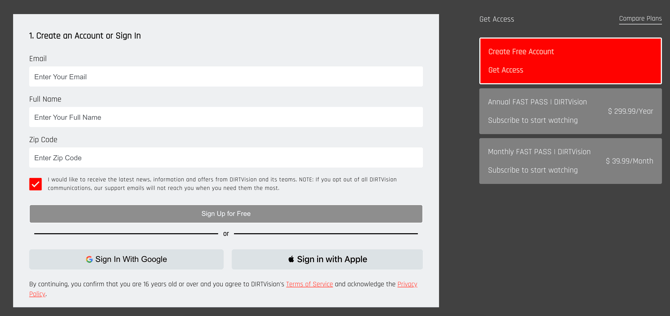
Choose one of the following options:
- Free Account – Access the DIRTVision Vault and other free content. Live racing is not included.
- Monthly Subscription – Includes access to live racing and subscriber-only content. (Does not include the 360 Knoxville Nationals and the Knoxville Nationals)
- Yearly Subscription – Includes access to live racing and subscriber-only content for one year.
After selecting your preferred option:
- Enter your account information.
- Click the button at the bottom of the page to create your account.
- A verification code will be sent to your email address.
- Enter the verification code when prompted to complete the setup process.
Once verified, you can log in and start enjoying DIRTVision content.
Didn't receive your verification code?
- Check your Spam or Junk folder.
- Confirm that you entered the correct email address.
- Wait a few minutes and request a new code if needed.