
How to request a refund:
-
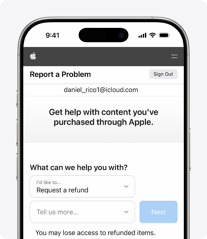
Sign in to reportaproblem.apple.com.
-
Tap or click “I’d like to,” then choose “Request a refund.”
-
Choose the reason why you want a refund, then choose Next.
-
Choose the app, subscription, or other item, then choose Submit. If you were charged for a subscription that you no longer want, you can also cancel the subscription.
Wait 24 to 48 hours for an update on your request
After you submit your request, you can check the status of your refund request.
If your request is approved by Apple, it might take additional time for the funds to return to your payment method.
For more information, visit: Request a Refund on Apple
If you need further assistance, you can contact Apple Support directly at Apple Support or by calling 1-800-APL-CARE (1-800-275-2273).